

Artificial Intelligence, Online Tools, Web Development
Seedance 2.5: Everything to Know Before Creating AI Videos

AI video sounds exciting, yet most people still have a list of basic questions before trying a new model. Does it create sound, or only moving pictures? How long can a clip be? Do characters stay the same from shot to shot? Is it any good for product ads? Can it use a real face? And is it safe for commercial work?
This guide answers those questions. Seedance 2.5 is a newer AI video model available through Topview, and it leans into longer 30-second clips, stronger multimodal input control, sharper 4K-ready output, and better audio-aware generation. The aim is to clear up the common doubts first, so you can start creating with fewer surprises.
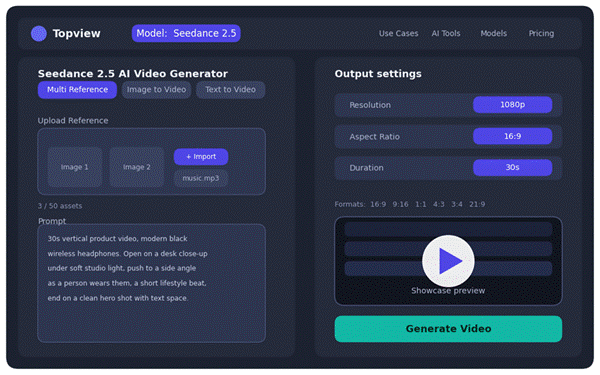
Illustrative mockup of a Seedance 2.5 generator layout. View the live page on topview.ai and confirm current options in your Topview account.
Seedance 2.5 in Simple Terms
At its core, Seedance 2.5 is an AI video generation model. You give it instructions and examples, it studies them, and it produces a short video. The instructions can be a written prompt, an uploaded image, a video clip, or even audio that sets the mood. As a rule of thumb, the clearer your input, the more controlled the output tends to be.
That flexibility makes it handy for a lot of formats: product ads, social videos, avatar explainers, tutorials, AI UGC clips, ecommerce demos, cinematic scenes, music visuals, and short storytelling.
The practical benefit is that you are not only generating one random AI clip. Because Seedance 2.5 is available across Topview’s tools, you can use the same model for different creative jobs, such as turning a product image into an ad, creating an avatar-led explainer, building a short social video, or testing a more cinematic 3D-style scene. That makes the workflow feel more connected, especially if you create videos for different platforms.
Once the basic idea makes sense, the next question is almost always about length, since that is one of the biggest shifts in this version.
The 30-Second Video Limit Changes the Workflow
Seedance 2.5 can generate videos up to 30 seconds. That number matters more than it first appears. A few seconds can capture a single moment, but 30 seconds can carry a complete idea from start to finish.
Think about how that plays out. A product ad can open with a hook, show the item in use, and close with a call to action. An avatar explainer can introduce a point, explain it, and wrap up naturally. A tutorial can move from the starting state to the main action to the result, and a fashion clip has time for the outfit, the movement, and the final look. In short, 30 seconds turns AI video from a quick demo into something closer to usable content.
Audio and Video Working Together
A lot of AI videos feel unfinished because the sound is bolted on afterward and never quite matches the motion. Seedance 2.5 highlights audio-aware generation, which means it considers timing, rhythm, dialogue, music, sound effects, and lip-sync (where available) as part of the video rather than an afterthought.
The payoff shows up across formats. Music videos feel more connected to the beat, avatar explainers sound more natural, and product ads can pair motion with the right sound effect. Dialogue scenes read as more believable when the timing lands. That said, do not assume it is perfect. Always review audio sync, lip-sync, dialogue timing, and sound effects before you publish.
Inputs You Can Use to Guide the Video
Seedance 2.5 supports multimodal control, and the official comparison highlights up to 50 text, image, video, and audio reference assets in this version. In practice, that means four kinds of input you can mix and match.
A text prompt sets the subject, scene, action, camera movement, mood, and ending. An image reference helps lock in a product, face, character, outfit, object, or visual style. A video reference can guide motion, pacing, camera movement, and overall scene direction. An audio reference can shape rhythm, mood, sound timing, and performance feel.
Here is how that looks together. For a skincare ad, a creator might upload the product photo, add a reference video showing a slow camera push-in, describe soft bathroom lighting in the prompt, and attach calm music as the mood. That gives the model far more direction than simply typing “make a skincare ad.” Once your inputs are clear, the next piece is writing a prompt that gives the model enough to work with.
Prompting Style for Better Multi-Shot Results
Multi-shot videos need structure. A vague prompt usually returns random results because the model has to fill in too many blanks. A stronger prompt describes the beginning, middle, and ending, and spells out the details that matter.
A useful prompt usually covers these points:
- Subject, scene, and the main action
- Camera movement and lighting
- Mood, video length, and aspect ratio
- Shot sequence, plus anything to avoid
Here is one detailed example you can adapt:
Example prompt: vertical headphone ad
Create a 30-second vertical product video for a modern black wireless headphone set. Start with a close-up of the headphones on a desk under soft studio lighting. Move into a smooth side angle showing a person picking them up and putting them on. Show a short lifestyle moment with the person working at a laptop while calm music plays. End with a clean hero shot of the headphones beside the case, leaving space for a text overlay. Keep the headphone shape consistent, avoid distorted hands, and make the motion smooth and realistic.
That prompt works because it names a clear subject, sets the shot order, explains the camera movement, fixes the mood, gives a consistency instruction, and tells the model what to avoid. Each of those lines removes guesswork.
Character Consistency Across Shots
One of the most common AI video problems is character drift, where a person's face, hair, clothing, age, or build shifts from shot to shot. Seedance 2.5 is positioned as stronger for continuity across longer clips, but it still helps to guide it carefully.
A few habits go a long way: use a clear face or character reference, keep clothing and scene details simple, and avoid asking for too many character changes in one video. Mention the important details in the prompt, lean on consistent lighting references, and always review the result before publishing. Consistency matters most for avatar explainers, brand presenters, storytelling scenes, UGC videos, product demos with people, and fashion content.
Multi-Shot Storyboards and Scene Planning
Seedance 2.5 can help build multi-shot videos, but it is not magic. The best results come when you hand it a planned sequence and think like a simple director. A clean five-step flow works well: an opening shot, an action shot, a detail shot, a result shot, and a final frame.
For an ecommerce product, that might mean the opening shot shows the product on a table, the action shot shows someone using it, the detail shot highlights texture or a key feature, the result shot shows the benefit, and the final frame leaves room for CTA text. This structure pairs naturally with the 30-second duration, as it provides enough time to show the complete flow without rushing.
Multi-Character Dialogue and Interaction
Here is the honest version. Seedance 2.5 is built for stronger generation and more natural dialogue performance where it is supported, but multi-character dialogue is still one of the harder things to get right in AI video. The more speakers, gestures, lip-sync, and emotional timing you ask for, the more carefully you need to check the output.
To keep things manageable, keep dialogue short, avoid stacking too many speakers into one clip, and use clear character references where you can. Keep camera movement simple, check lip-sync and expressions, and regenerate if faces or timing start to drift. For professional work, one presenter or two simple characters are usually far easier to control than a crowded scene.
Real Human Face References
Image references can help guide faces and character appearance, but this is an area to treat responsibly. Only use real human face references when you have permission and the platform's terms allow it. Face likeness tied to public figures, private individuals, brand ambassadors, or customer images deserves extra care.
A quick rule on faces
- Do not use someone's face in commercial AI video without clear rights or consent.
- Check Topview's current rules before uploading any face reference.
- Review final results so the representation is not misleading or inaccurate.
Product Ads and Ecommerce Videos
This is where Seedance 2.5 shines for many creators. Thirty seconds is enough room to show the product, the usage, the benefit, and a call to action. Stronger references help keep the product close to the original image, and better continuity makes the clip feel deliberate rather than random.
A water bottle ad can show condensation, gym use, and a final CTA. A skincare ad can move through texture, application, and a glowing close, and a gadget ad can run from close-up to use case to lifestyle benefit. Whatever the product, check the shape, logos, small text, labels, and hands before publishing, since these are the details AI tends to slip on.
For ecommerce teams, this also connects naturally with Topview’s wider toolset. Since Seedance 2.5 is available across Topview’s tools, a creator can use it for product ads, AI UGC-style videos, avatar product explainers, and short social clips without rebuilding the workflow from scratch each time. That is useful when one product needs several versions for TikTok, Instagram Reels, YouTube Shorts, Shopify pages, or paid ads.
4K-Ready Video Quality
Seedance 2.5 is described as sharper and 4K-ready. It is worth keeping the wording careful here: that positions it for higher-detail output and more polished visuals, but you should still check export options, plan limits, and current Topview settings before assuming a specific final format.
Quality is not just a vanity metric. Product videos need visible detail, brand videos need polish, and cinematic scenes need cleaner frames. Avatar videos benefit from sharper facial detail, and social ads simply look more trustworthy when the image is crisp.
Generation Speed and Testing
Seedance 2.5 is positioned as faster, with quicker previews. Rather than quote exact times that can vary, it is fairer to say generation speed depends on video length, input complexity, resolution, server load, and your plan.
Speed matters because AI video is rarely a one-shot process. You usually generate several attempts before something clicks, and faster previews make that testing loop easier, so you can compare hooks, angles, prompts, and styles quickly. For agencies, that can mean more client concepts in less time.
Commercial Use and Rights
Whether you can use Seedance 2.5 videos commercially depends on the platform's current terms, your plan type, the assets you uploaded, and your rights to any references. Before putting clips into ads, client work, ecommerce listings, or paid campaigns, check Topview's official terms.
A few key points are worth keeping front of mind: use only product images, faces, audio, logos, and video references you own or have permission to use, and avoid misleading face or voice usage. Check the watermark rules and export quality rules, confirm whether commercial use is included in your chosen plan, and keep records for client work when you need them.
Seedance 2.5 Compared With Seedance 2.0
The clearest way to see the jump is side by side.
| Feature | Seedance 2.0 | Seedance 2.5 | Upgrade |
|---|---|---|---|
| Max video length | Up to 15 seconds | Up to 30 seconds | Yes |
| Visual quality | Strong HD output | Sharper, 4K-ready | Yes |
| Generation speed | Standard | Faster previews | Yes |
| Scene continuity | Good | Stronger across shots | Yes |
| Text-to-video control | Solid | More precise | Yes |
| Image-to-video consistency | Reliable | Tighter to reference | Yes |
| Video reference control | Supported | More guided motion | Yes |
| Audio reference timing | Basic | Audio-aware rhythm | Yes |
| Lip-sync and dialogue | Available | More natural where supported | Yes |
| Native audio | Dialogue, effects, lip-sync | Richer, audio-aware | Yes |
| Multimodal input limit | Up to 12 files | Up to 50 references | Yes |
| Best use cases | Short clips, demos | Ads, UGC, avatars, cinematic | Wider |
| Platform | Topview | Topview | Same |
Reading down the table, the headline is not just in length. Seedance 2.5 doubles the clip to 30 seconds, lifts the reference limit from about 12 files to 50, and is positioned as sharper, faster, and stronger on continuity and audio-aware rhythm. The real story is more room, more control, and a wider set of practical use cases.
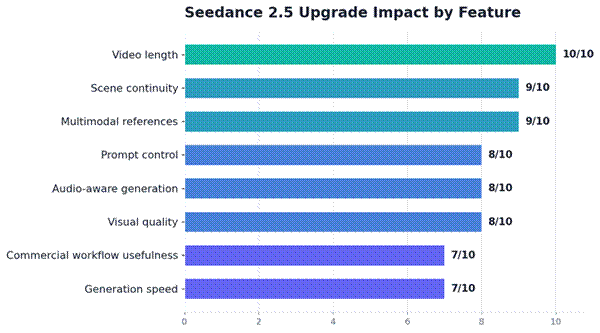
These scores are editorial estimates based on feature usefulness for creators, not official benchmark results.
The pattern is deliberate. Video length, multimodal references, and scene continuity score highest because they decide whether the output can become a usable ad, explainer, demo, or social video. Visual quality, audio-aware generation, and prompt control sit just below, since they shape how polished and on-brief the result feels. Generation speed and commercial workflow usefulness round things out: speed helps, but it matters most once the core output is already strong, because fast previews of a weak result do not save the project.
Biggest upgrade areas
- Longer 30-second clips and up to 50 references unlock complete stories instead of quick demos.
- Stronger continuity and audio-aware generation make the output feel finished, not stitched together.
- Faster preview speeds up testing once the creative direction is set.
Use Cases That Benefit Most
Not every format gains equally. The breakdown below is an editorial view of where Seedance 2.5 fits best, based on its features, not official usage data.
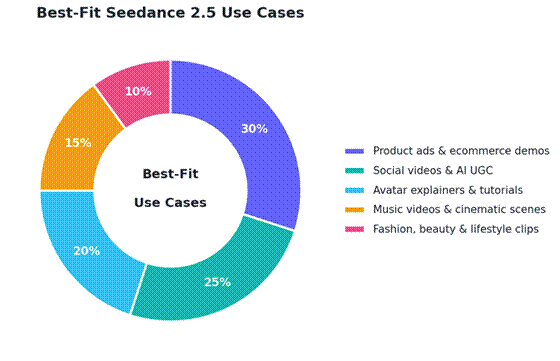
Editorial breakdown based on feature fit, not official usage statistics.
Product ads and ecommerce demos take the largest share because they benefit from product references, 30-second storytelling, steady continuity, and a clear CTA structure, which maps almost exactly onto what an effective short ad needs. Social videos and AI UGC follow close behind, since creators can test hooks quickly and iterate without much overhead.
Avatar explainers and tutorials use the duration and audio timing to walk through a point at a natural pace. Music videos and cinematic scenes lean on rhythm and visual polish, while fashion, beauty, and lifestyle clips draw on movement and sharper detail. Every slice benefits from the same core upgrades, just in different proportions.
Common Output Issues to Check
Even a strong model needs a review pass before anything goes live. Run through this checklist on every clip:
- Hands and fingers, plus faces and identity consistency
- Product shape, logos, labels, and any small text
- Lip-sync and audio timing
- Lighting changes and background drift
- Unwanted object changes between shots
- Aspect ratio and export quality
- Commercial rights for every asset used
Checking these is not a sign the tool is weak. It is simply good practice, and it keeps your published work accurate and trustworthy.
A Simple First Project to Try
Rather than firing off random prompts, start with one focused 30-second video. A product ad, social hook, avatar explainer, or short ecommerce demo all make good first projects. Use a simple flow: an opening hook, the product or topic reveal, the main action, the benefit or explanation, and a final frame with a CTA.
Here is a beginner-friendly prompt to start from:
Example prompt: reusable water bottle
Create a 30-second vertical product video for a reusable water bottle. Start with a close-up of the bottle on a kitchen counter, then show someone filling it with cold water, placing it in a gym bag, and using it after a workout. Use bright natural light, smooth camera movement, realistic hand motion, and a clean lifestyle Ad style. End with a final hero shot and space for text overlay. Keep the bottle shape and color consistent throughout the clip.
Final Takeaway
Seedance 2.5 is useful because it tackles the exact problems people complained about with AI video: clips that were too short, characters that drifted, limited control, mismatched audio, and output that looked unfinished. The move to 30-second generation, broader reference support, 4K-ready quality, audio-aware features, and Topview’s browser-based setup makes it more practical for real creators.
That practicality becomes more important when the same model is not limited to one video-generation flow. With Topview Canvas and Topview Drama Studio also expected to support Seedance 2.5, creators should have more room to plan, shape, and turn ideas into finished video formats within the same ecosystem.
The smartest way to judge it is not by reading the feature list. Pick one real video idea, give it a clear prompt and strong references, generate a few versions, and see whether the result actually fits your content workflow.
Comments
Comments are moderated to keep the discussion useful and respectful. Spam, automated submissions, and low-value promotional comments are removed. Comments with outbound links may be approved when the link is relevant to the article and genuinely helpful to readers.
No comments have been published yet.