

IP Address, Cloud Services, Geolocation
Steam Game Localization: UI, Files, Servers, and Pricing
Steam game localization is not just a translated store page. It is the production work that decides what a player sees, hears, downloads, reads, and understands when they launch the game in a specific language or region.
For an indie title on Steam, that can include string tables, localized UI assets, fonts, subtitle timing, voice-over files, achievement text, server-region labels, regional pricing setup, Steam screenshots, and language-specific packaging. The executable may stay mostly the same, but the game experience changes because different data and assets are loaded for different locales.
A good localization pass answers three practical questions:
- What text changes?
- What visual assets change?
- How does the game know which localized version to load?
That makes full game localization for indie titles on Steam a technical, visual, and QA pipeline, not a final proofreading task.
What Game Localization Actually Changes
In most games, localization does not mean creating a separate executable for every language. It usually means separating player-facing content from code, then loading the correct content at runtime.
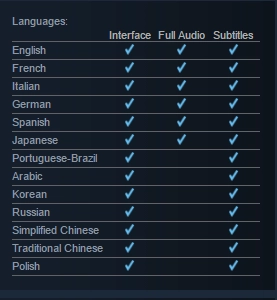
Steamworks treats store page localization and in-game localization as separate components. For in-game localization, Steam can expose the user's selected game language, while larger language-specific assets can be distributed through language depots when needed, as described in the Steamworks localization documentation.
Inside the game, the localized content usually lives in several layers.
- String data: Includes menu labels, HUD text, inventory names, item descriptions, quest text, system messages, tutorial copy, achievement names, and achievement descriptions.
- Asset data: Includes localized textures, sprites, posters, in-world signs, tutorial panels, text icons, UI atlases, screenshots, and videos.
- Audio and subtitle data: Includes voice-over files, subtitle strings, caption timing, speaker names, and cutscene text.
- Formatting rules: Cover plural forms, variables, gendered language, date and number formatting, line breaks, fallback text, and language-specific typography.
- Runtime selection: Decides which locale to use. A game may read the Steam language, use the game’s own settings menu, fall back to the operating-system locale, or let the player override everything manually.
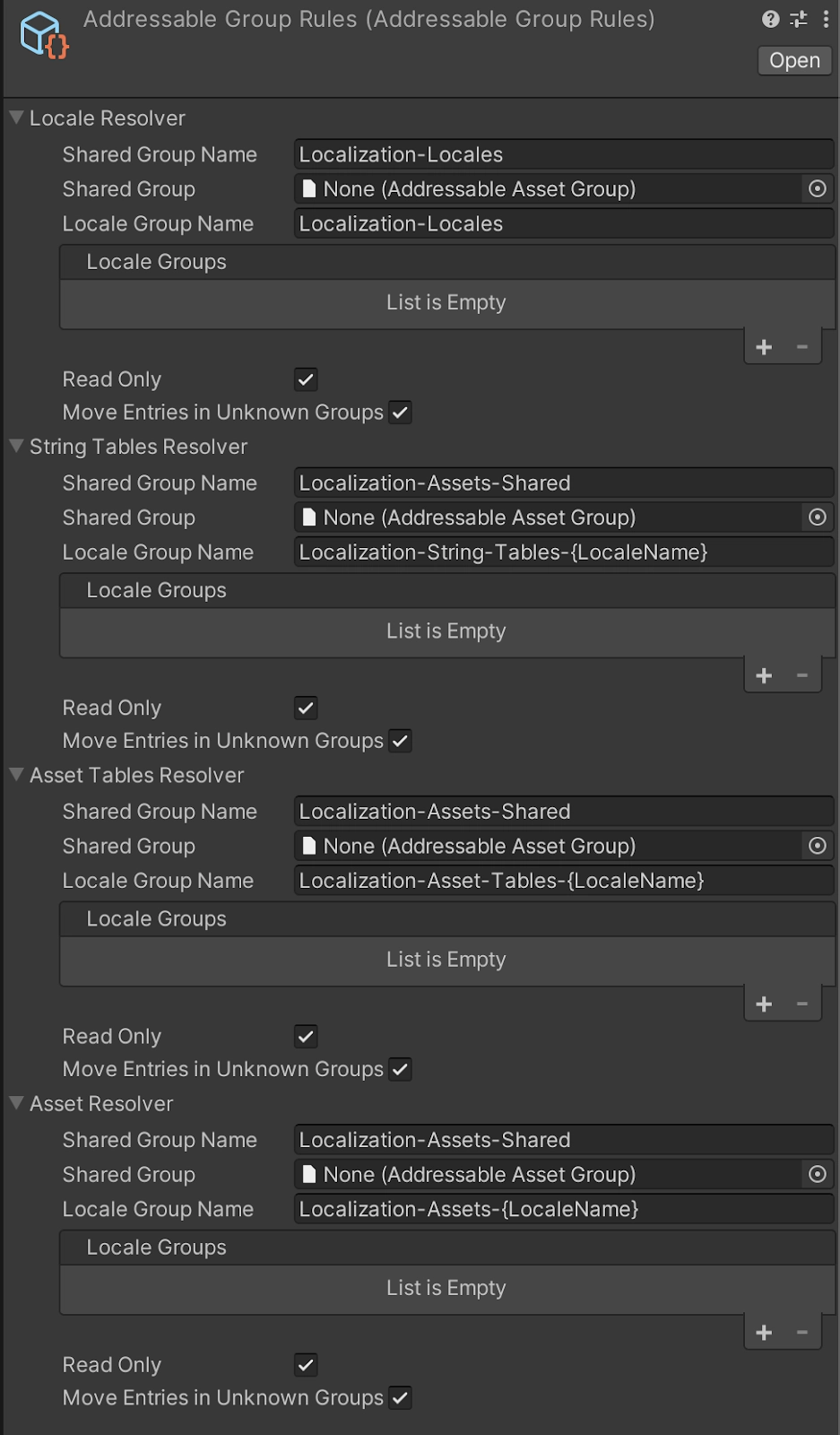
Unity, Unreal, and custom engines organize this differently, but the principle is similar. Unity projects commonly use string tables and asset tables. Unreal projects gather source text, export translation files, and compile localized resources used at runtime. Custom engines might use JSON, CSV, PO, XML, binary tables, or database-backed localization systems.
The file format matters less than the production rule: player-facing UI text should not be hard-coded, and essential visual text should not be flattened into art unless the team is prepared to create localized asset variants.
UI and HUD Localization Are Design Problems
The hardest part of game localization is rarely the dictionary. It still makes the translated game feel designed.
A short English label can become a long German compound. A phrase that fits one line in English may need two lines in Spanish or French. Japanese or Chinese may use fewer characters but require different glyph coverage, line height, and font handling. Arabic and Hebrew can introduce right-to-left layout needs. Controller prompts, subtitles, tooltips, quest objectives, and HUD labels all need to survive those changes while the player is moving, fighting, reading quickly, or making decisions.
That is why localized UI should be tested inside the game, not only in a spreadsheet. The QA pass should include real menus, HUD states, dialogue windows, inventory screens, maps, tutorial panels, achievement popups, subtitles, and controller prompts.
Volodymyr Liubchuk, Art Director at VSQUAD studio, describes the visual side of the work this way:
"Game localization breaks most often inside the interface, not inside the translation file. We check localized text in the actual HUD, dialogue windows, inventory screens, map markers, tutorial panels, achievement popups, and controller prompts. A translated line can be linguistically correct and still damage the composition if it pushes the player’s eye away from the action, covers a gameplay cue, or forces the UI to shrink until it feels cheap. Good localization keeps the same visual priority in every language."
This is the key point: localization is not only “Is the text translated?” It is also “Does the localized version preserve hierarchy, readability, rhythm, and gameplay clarity?”
Visual Assets Need A Separate Pass
Visual localization is easy to underestimate because many asset problems are invisible until the first localized build is tested.
A game may have English text inside tutorial screenshots, loading-screen tips, quest boards, in-world signs, UI backgrounds, ability icons, map labels, achievement art, trailer captions, or Steam screenshots. If the art pipeline keeps text separate from the image, localization is cleaner. If the text is baked into a flattened texture or video, the team may need one asset variant per language.
That affects build size, patch size, QA time, and Steam depot planning. A practical rule for indie teams is simple: keep essential text out of flattened art whenever possible. When visual text cannot be avoided, track it like a production asset with a source file, owner, locale list, export size, and QA state.
Server Locations, IP Signals, and Language Are Different Decisions
For online games, localization also touches networking. Server names, matchmaking regions, ping labels, connection errors, and maintenance notices all become part of the localized experience.
IP-based geolocation can help estimate where a connection appears to come from, and our IP Lookup is a relevant example of how that kind of lookup is presented. But IP location should not be treated as the same thing as language.
A Spanish-speaking player may live in Germany. A Brazilian player may be traveling. A player may use a VPN. A mobile ISP may route traffic through a city that is not the player’s actual location.
For a localized Steam game, it is safer to separate these decisions:
- Interface language should come from Steam language, an in-game setting, or a manual player choice.
- Server region should use ping, matchmaking pool, server availability, and player selection.
- Regional pricing should follow Steam country, currency, package pricing, and platform commerce rules.
- Fraud or analytics review can use IP as one signal, but not as a complete identity.
A localized multiplayer game should make region controls understandable in every supported language. “Europe,” “US East,” “Brazil,” “Asia,” and “Auto: best ping” need to be clear. Error messages should also explain what happened: server distance, maintenance, matchmaking, timeout, or local network failure.
Regional Pricing Belongs In The Same Launch Plan
Regional pricing is not part of a translation file, but it is part of a localized Steam launch. If a team localizes into a market but ignores local purchasing expectations, the game can still feel distant or poorly prepared.
The important point is not to guess a player’s price from language or IP. Pricing should be handled through Steam’s pricing and currency tools. The localization planning question is broader: if a region is important enough for language support, does it also need localized store copy, localized screenshots, community support, server messaging, and a pricing review?
This keeps localization from becoming a loose list of languages. It connects copy, build data, UI, networking, commerce, and support.
Steam Achievement Localization Needs Context
Steam achievement localization is a small task until it breaks immersion. Achievement names and descriptions often contain jokes, idioms, spoilers, item names, mission references, or tone-specific phrases. They also appear outside the game in Steam overlays, profiles, community pages, and completion lists.
A proper achievement pass should check terminology, hidden-achievement spoilers, joke adaptation, icon art, layout fit, and consistency with in-game quest or item names. If achievement icons contain language-specific text, they belong in the asset localization tracker. If the achievement name contains a pun, the translator needs design context, not just a string ID.
Practical Localization Checklist
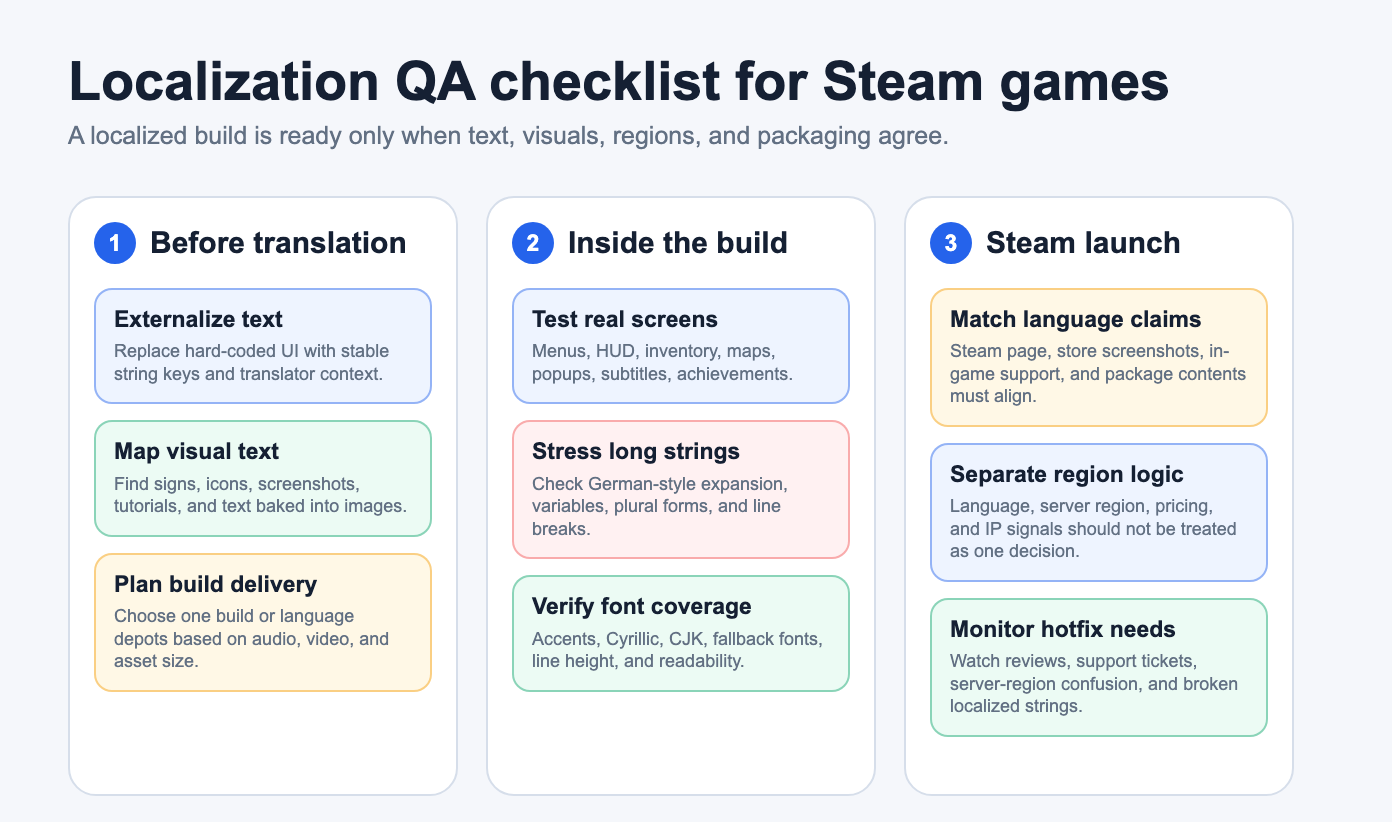
Before publishing a localized Steam build, review the game as a player would experience it.
- Before translation, externalize player-facing text, map visual text, plan supported locales, and decide whether localized content should ship in one build or language depots.
- Inside the build, test real screens: menus, HUD, inventory, maps, subtitles, popups, achievements, and controller prompts. Stress long strings, variables, plural forms, font fallback, CJK glyphs, accents, Cyrillic, line height, and screen-safe areas.
- Before launch, make sure Steam language claims match the actual build. Store screenshots, in-game support labels, language settings, package contents, server-region text, and pricing decisions should all tell the same story.
- After launch, monitor reviews, support tickets, region confusion, broken strings, missing glyphs, and hotfix needs. Localization continues after release because live players will find context that spreadsheets and test passes can miss.
Steam localization works when engineering, art direction, UX, publishing, and QA share the same plan. Translation is one layer. The finished localized game is the combination of runtime data, packaged assets, readable UI, regional expectations, and a visual experience that still feels intentional in every supported language.
Conclusion
Steam game localization involves much more than translating text. A complete localization process includes adapting interface elements, visual assets, subtitles, achievements, runtime language selection, regional store content, and quality assurance so players receive a consistent experience in every supported language.
For indie developers, treating localization as part of the production pipeline rather than a final translation task can help avoid costly revisions later. Planning localization alongside engineering, art, UX, publishing, and testing makes it easier to support multiple languages while maintaining gameplay clarity, visual consistency, and a polished player experience across regions.
Comments
Comments are moderated to keep the discussion useful and respectful. Spam, automated submissions, and low-value promotional comments are removed. Comments with outbound links may be approved when the link is relevant to the article and genuinely helpful to readers.
No comments have been published yet.